

Far Cry 6 Ps5 Screen Tearing
WePC is reader-supported. When you buy through links on our site, we may earn an affiliate commission. Learn more
Terminal Updated:
Screen tear is arguably one of the well-nigh annoying visual artifacts you tin can feel when gaming – only what exactly is screen tear?
We've all been there, playing our favourite game then, all of sudden, we get hit with screen fierce like there's no tomorrow. Your monitor attempts to brandish more frames than information technology can handle and the resulting image is a mish-brew of multiple frames that only don't line upwards – represented past a horizontal line through the centre of your frame.
Fifty-fifty today, as we enter 2022 and see new technologies developed to effort and gainsay screen tear, many suffer in silence. Well, maybe that's a trivial dramatic, but the point I'm making is you shouldn't accept to experience screen tear in the modern age of gaming monitors – merely many exercise.
All the latest gaming monitors offer some form of combative engineering science to try and eliminate screen tear – with most succeeding to a high percent. Even gaming-tailored TVs at present offer variable refresh rate engineering science to assistance reduce it.
Fortunately, screen fierce on both gaming monitors and gaming TVs can be eradicated fairly easily – and nosotros're here to explain exactly how you lot exercise it. The post-obit article will exist a closer await at exactly what screen trigger-happy is and the all-time manner to end it from occurring.
What Is Screen Tearing
Screen tear is a visual artifact that occurs when your graphics bill of fare's frame charge per unit doesn't match your monitor's refresh rate – leading to two (or more than) frames beingness displayed past the monitor at the same fourth dimension.
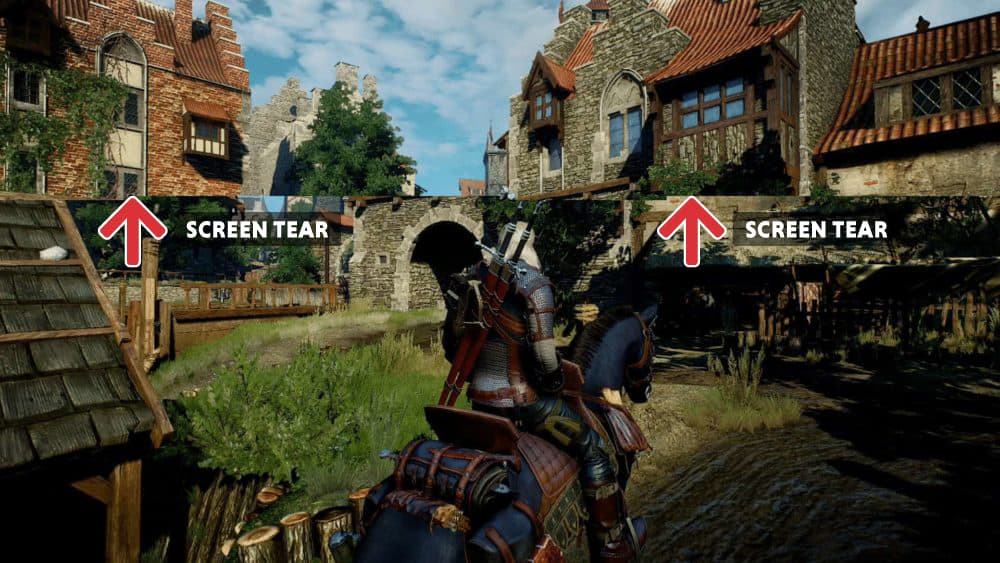
The image above is a perfect example of screen tear in action. Every bit you can see, the two frames don't friction match up properly, reducing the overall visual experience exponentially.
This visual antiquity only lasts for a split 2nd but can occur hundreds of times over a gaming session. Whilst this isn't too offputting to some gamers, others can find it very distracting. Furthermore, if you're the kind of person who likes to indulge in competitive titles, this tin frequently be the difference between winning and losing – reducing your overall concentration and immersion levels.
How To Prepare Screen Violent
Fortunately, fixing screen tearing is fairly piece of cake. There is a tonne of different ways to reduce screen tear – or in some cases completely eradicate information technology birthday.
Let's starting time off with yesteryear's almost popular solution – VSync.
Remember to always proceed your graphic drivers upwardly to date.
VSync
V-Sync, or vertical sync, was (historically) the merely fashion to rid your gaming feel of abrasive screen tears. The technology would synchronize the vertical refresh rate of your display with the frame rate your GPU was providing, resulting in a smoother gaming experience overall. However, considering VSync would give priority to the monitor, your PC's GPU would often accept to look until your monitor was fix to receive a frame before it sent it – leading to juddering, blanking, and increased input lag. This is one of the main reasons why people would often disable this hardware feature.
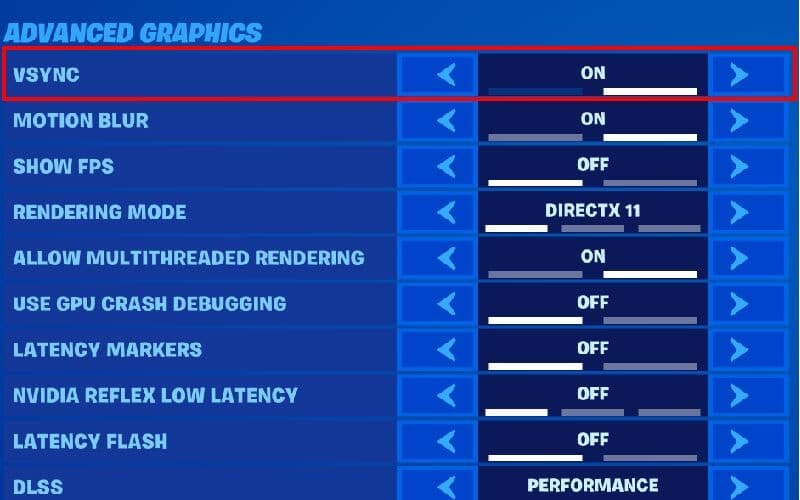
For example, if you were using a 60hz monitor and enabled VSync in the GPU settings, regardless of what FPS you were getting, yous would be forcing your GPU to cap the framerate to threescore. Equally you lot can imagine, this would have a huge knock-on issue on the gaming feel.
For this reason, competitive players would oft accept to settle for some screen vehement, as the input lag would exist too detrimental to their operation. Still, single-player titles that didn't rely then heavily on responsiveness could enjoy a screen tear-gratis experience without besides much affect on their gameplay.
Fortunately, modern monitors have far exceeded the functioning of previous alternatives, with many offering upward 240hz to 360hz refresh rates. Every bit you climb the theoretical refresh rate ladder, y'all volition naturally see a reduction in screen tear – but that'southward mainly down to the tech that's incorporated in higher-terminate panels.
Nvidia'southward Adaptive VSync
We've simply really touched upon users that experience screen tear when they go a higher in-game frame rate than their monitor's refresh charge per unit. Even so, screen tearing can also occur when you go the other style – FPS dropping below the maximum refresh rate of the monitor.
In this scenario, users that own a GeForce GTX 650 and in a higher place will exist able to employ Nvidia's Adaptive Sync – a feature of Nvidia GPUs that turns off VSync when your frame rate drops below 60 FPS.
At this point, you're probably request yourself, why's dropping below 60FPS such an issue when using VSync? And the answer lies with the way technology works. If you lot're using a 60hz monitor and your in-game frame rate drops to below lx (say 55), then VSync will half your monitor's refresh rate (to 30) to enable it to keep reducing screen vehement.
Past doing this, you volition instead experience a lot of stuttering, a visual artifact that is much worse than the occasional screen tear.
Nvidia Fast Sync & AMD Enhanced Sync
A technology that is oft disregarded is Fast Sync (Nvidia) and Enhanced Sync (AMD). If yous own a GeForce 900 series or AMD GCN-based GPU, or newer, you'll exist able to access either of these technologies.
Unlike VSync (which limits your frame rate to the maximum refresh rate of your monitor), Fast Sync and Enhanced Sync simply feed your monitor the most recently completed frame. This is great for individuals that are getting drops in FPS, every bit y'all won't exist limiting yourself to the monitor's ability, yous'll but be waiting for your GPU instead. This will not just have a positive impact on screen tearing, it'll also reduce input lag too.
That being said, it doesn't better input lag altogether – there will merely exist a noticeable difference when comparing information technology to VSync. Ultimately, the higher your frame charge per unit is, the lower your input lag will exist. In an ideal world, users should aim to get around double the frame rate of your monitor's maximum refresh charge per unit – resulting in noticeably lower input lag.
Nvidia G-Sync/ AMD FreeSync
Recent times take paved the way for much more than effective ways of reducing screen tear, with both AMD and Nvidia offering their proprietary variable refresh charge per unit technologies. These technologies, unlike the above options, let your monitor to change its refresh rate dynamically to match your GPU'due south frame rate output. Granted, not every monitor (or GPU) supports this technology, simply most will – so don't be too put off.
What that ways is, if you're getting 100 frames per second playing Red Dead 2 on a 240Hz monitor, VRR will reduce the monitor's refresh charge per unit from 240 to 100 – matching your in-game FPS and eradicating screen tear almost entirely. At this stage, you lot might exist wondering what kind of effect this has on the input lag. Thankfully, due to the way variable refresh rate works, input lag is inappreciably affected – with near cases resulting in a sub 1ms increase.
For the almost part, Nvidia Yard-Sync is merely supported by Nvidia GPUs – and vice versa for AMD alternatives. Nonetheless, as many articles will explain, this isn't e'er the case. Many monitors can be used with both technologies – admitting with varied performance output.

Having said that, each Nvidia One thousand-sync monitor (not compatible) comes equipped with its own integrated Thousand-Sync module. FreeSync, by comparison, utilizes the monitor'due south congenital-in adaptive sync functionality instead.
Information technology's worth mentioning that, K-Sync and FreeSync and both express to the maximum refresh rate of your console. So, if you're running a 144hz monitor, y'all won't exist able to reap the rewards of VRR if you lot're getting above this in FPS.
Cheque out our complete guide on G-sync vs One thousand-sync compatible here.
Fixing screen tear on modern TVs
Equally we mentioned in the intro, while nonetheless rare, we are seeing the implementation of variable refresh rate technologies in the latest gaming tailored TVs. LG is a great instance – especially the company's C-serial – providing great gaming performance thanks to it'southward VRR support.
Just like a gaming monitor, you lot'll be able to link your console up to your TV and enable VRR to sync the framerate to your TV's refresh rate.
Select TVs have implemented VRR in the grade of AMD'south license-free or HDMI Forum VRR that was saw developed as part of the HDMI 2.1 upgrade. This was largely due to the arrival of PS5 and Xbox Serial 10 consoles – both of which could support 120Hz at 4K resolution.
- Best gaming monitors for PS5
- All-time gaming monitors Xbox Serial 10
- Best gaming monitor
- Best gaming monitor under $500
- Best gaming monitor for Xbox Series S
What is screen violent: FAQs
What is screen tearing?
Screen trigger-happy is a visual artifact that occurs when your graphics menu sends also many frames to the monitor, resulting in two frames being rendered at the same fourth dimension. This may simply occur for a carve up second, nonetheless, multiple screen tears over a brusk period of time tin can ruin your visual experience a lot.
What is causing screen tearing?
The master matter causing screen vehement is unmatched frame rate and refresh charge per unit. When your monitor doesn't take the ability to match its refresh rate to your PC's refresh rate, the issue is screen tear.
Does screen trigger-happy happen at 144Hz?
Sadly, it does. Screen tear can happen at whatsoever refresh rate – as information technology isn't the refresh charge per unit that's the trouble. Instead, it's your monitor's ability to lucifer its refresh rate to the PC's frame rate output. That means screen tear tin can happen at 60Hz, 120Hz, or 300Hz.
Is screen tearing common on 60Hz monitors?
With 60Hz monitors often beingness upkeep-tailored monitors, there is an increased chance that they don't characteristic frame-syncing engineering. For that reason, on average, 60Hz monitors are more than likely to feel screen tearing than a newer, 144Hz and in a higher place monitor.
Final Thoughts
So, there you have it, our quick guide on 'what is screen tearing' and a number of different methods geared towards reducing it. Nosotros promise this guide has made understanding screen tear a little easier, giving y'all a amend understanding of the fixes and how they work. As nosotros settle into a new decade, most of the engineering you run into above has almost go obsolete, with G-Sync and Freesync taking over the bulk of modern-day setups. That existence said, some people still find benefits of using older technologies – information technology all depends on your particular setup.
If you take whatsoever questions regarding screen tear, how to fix screen tear, or just what is screen vehement, experience free to driblet u.s. a comment beneath and we'll get back to you as soon every bit nosotros can.
Source: https://www.wepc.com/gaming-monitor/faq/what-is-screen-tear/
0 Response to "Far Cry 6 Ps5 Screen Tearing"
Post a Comment